| |
Without
AutoVAULT |
With
AutoVAULT |
|
 |
Vaulting
process is not automated
-
You must write
DRM vaulting scripts to automate tape vaulting or
run the vaulting commands manually every day, which
introduce plenty of potential for human error when
interruptions occur and steps get missed.
-
Writing the scripts is a time-consuming and
error-prone process and generally include very
limited error checking.
-
Tapes
to be vaulted must be manually checked wastes plenty
of time.
-
Staff turnover and TSM upgrades make ongoing
support challenging and uncertain.
top
|
 |
Less Stress ... More Time!
Reduce your stress, have confidence the correct data is
offsite, and regain 14-28 man-hours per month per TSM
server. When backup windows are tight and staffing is
stretched thin, AutoVAULT will help you be more
flexible, efficient, and accurate in your data movement.
-
With AutoVAULT, you can
configure what TSM media
you want to manage and AutoVAULT will
automatically check out the media and notify your
operators of what media to move.
-
AutoVAULT
individually verifies each tape checkout and
captures all checkout failures. You can glance at a
report and know if the correct data is going
off-site, without having to manually check each
tape. This saves time and increases accuracy.
-
AutoVAULT can be initiated manually by your
operators, but it is typically executed
automatically by TSM.
-
AutoVAULT will be updated for each new release
of TSM, so you will never have to worry about code
changes or that the author of your scripts might
leave your company.
AutoVAULT
works with or without Disaster Recovery Manager (DRM)
and supports all DRM
functions including MOVE DRMEDIA, MOVE MEDIA, and PREPARE.
top |
|
| |
Without
AutoVAULT |
With
AutoVAULT |
| |
No
vaulting reports
|
 |
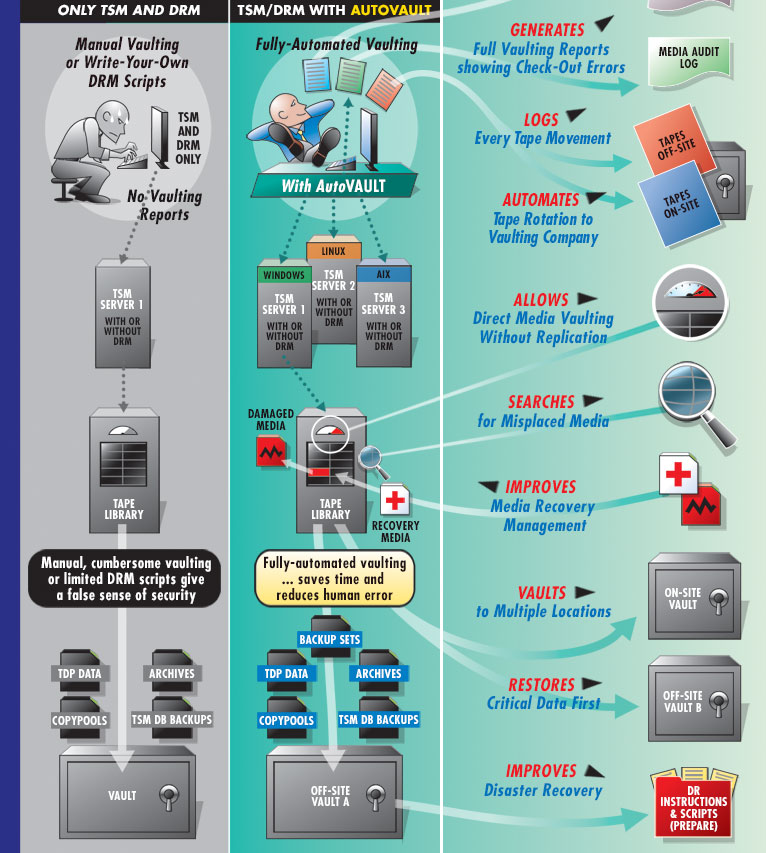
Includes all the vaulting reports you need
-
Media Rotation Reports tell you and TSM which
media to vault offsite and which to return.
Individual tape check-out errors are clearly listed
on the tapes to take offsite report.
-
A report of your complete vault inventory is
also created.
-
All three reports can be automatically sent via
print, email, and/or web.
-
You can customize the report headings and the
data sort order separately for each report.
-
Media totals are included at
the end of each report plus totals per vault
location.
-
Automatically FTP your
tape movement information to your vaulting company.
top
|
|
| |
Without
AutoVAULT |
With
AutoVAULT |
| |
No
media audit log
|
 |
Media Audit Log
|
|
| |
Without
AutoVAULT |
With
AutoVAULT |
| |
No
interface to external media
management software or vaulting companies
|
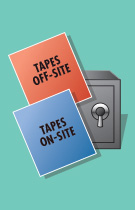 |
Automatically interfaces with vaulting companies and external media
management software
-
AutoVAULT allows you to automatically
FTP your tape
movement information daily to Iron Mountain and
other vaulting companies
as long as they support electronic reporting. No
more daily forms to fill-out, no more scripts to
write and maintain, much less potential for human
error.
-
AutoVAULT also provides an
interface to media
management software to track all
your TSM media movement and provide more control of
your data. This allows you to add functions like barcode
tracking and slot-level vaulting.
-
Interface files contain media names and vault
locations for media moving onsite and offsite.
AutoVAULT now also creates separate tapeoff and tapeon interface files for each vault location
plus a unique interface file for media returned for emergency
use.
top
|
|
| |
Without
AutoVAULT |
With
AutoVAULT |
| |
No
error checking
|
 |
Improve the security of your data
-
AutoVAULT tape
vaulting is more accurate, making restorations of
data more reliable.
-
AutoVAULT
continually searches your libraries for tapes that
should be off-site and re-vaults them when found.
top
|
|
| |
Without
AutoVAULT |
With
AutoVAULT |
| |
Overcrowded tape
library or
Backup process
taking too long
-
Database, email, or archive media are filling up
your tape library.
-
Copying your TDP data delays your daily
vaulting.
-
For
those using TSM to backup
hardware based copy
functions like Flashcopy Image or VE-supported
technologies, creating both a
TSM primary pool and copy pool of your data can be
more than you need, but you have no choice. This
uses plenty of time and resources. Look to AutoVAULT
for helpful options.
top
|
 |
More solutions for overcrowded tape libraries and backup processes
that take too long
Are TDP
or Archive media filling your
library or taking too long to copy? AutoVAULT provides helpful
solutions to get your important data offsite and free-up expensive
library slots.
|
-
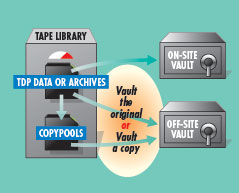
Duplicate your TDP to a
copy pool for offsite vaulting and vault
the original TDP media and any archive media to an
onsite vault OR
-
Take primary TDP
backups and archives offsite, freeing expensive tape library
slots and eliminating the time and media to
duplicate the data. With reliable tape technology,
this can be a valuable option.
|
 |
Control when tapes are vaulted
-
AutoVAULT can now
restrict primary pool media vaulting to only eject FULL media
and/or media that has not been referenced for a specific
number of days. Both
options can be specified individually or combined.
This allows you to remove long term data, such as
archives, from your library when the media is full and vault
it to an onsite vault location.
-
AutoVAULT
will now allow you the option to vault Copypool
media only when FULL. This should only be used under
very special circumstances.
For
Flashcopy Image or VE-supported technologies Users
AutoVAULT allows direct media vaulting without
replication … to shorten backup windows and, in some cases, reduce
the overall copy management needed. For those using Flashcopy Image
or VE-supported technologies, AutoVAULT also eliminates the time-
and resource-wasting step of replicating to both a primary pool and
a copy pool ... making managing the Primary Pool tapes more
cost-effective. top
|
| |
Without
AutoVAULT |
With
AutoVAULT |
| |
Clumsy
offsite media retrieval
|
 |
Automated offsite media retrieval
-
You
select the volumes
to retrieve and AutoVAULT
generates a report of volumes to return onsite.
-
AutoVAULT
also excludes the
media brought onsite for an emergency so you can
continue normal vaulting operations while the media
you need is left in your library.
top
|
|
| |
Without
AutoVAULT |
With
AutoVAULT |
| |
No support for
multiple vaults
-
Difficult to manage media in different vault
locations.
-
TSM has no easy way to classify your offsite
data so that the most critical data is vaulted
together for faster restoration, and all other data
is vaulted separately.
top
|
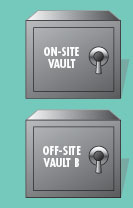 |
Allows you to manage multiple vault locations
and Restore Critical Data First
-
This is helpful if you would like the added
security of keeping two copies of your data offsite
at different locations.
-
It also lets you prioritize your data by
setting up
two different locations within the same offsite vault
(such as critical data and regular data).
In the event of a disaster, you can more quickly
restore your critical data first.
-
Multi-vault support also allows you to vault data to
both an offsite and onsite vault.
-
AutoVAULT prints vaulting reports by vault
location, so the media can be managed separately.
top
|
|
| |
Without
AutoVAULT |
With
AutoVAULT |
| |
Slow, complicated
disaster recovery
-
DRM recovery scripts must
be expanded into many individual files and run in
the correct order, which takes an experienced TSM
technician to do it right.
-
Minimal disaster recovery
instructions are included.
top
|
 |
Recovers your TSM servers quickly and accurately
-
AutoVAULT creates an
easy-to-use disaster
recovery procedure for you with all the necessary
instructions and scripts to quickly and completely
recover your TSM server environment.
-
AutoVAULT creates both DRM and AutoVAULT disaster recovery
scripts for your
use. You can decide which scripts you wish to use.
-
If your TSM technician is unavailable during a
disaster, another technician can follow the
instructions and successfully complete the recovery.
top
|
|
| |
ADDITIONAL
AutoVAULT
FEATURES |
| |
 |
Run
AutoVAULT on one server several times
or several servers in
series
AutoVAULT accepts parameter input to control
which TSM server to execute. You can
run one TSM server instance, all defined instances, or a
combination of instances in any order.
There is also a time delay option allowing a pause
between executions. This
is very useful when when you are regularly exceeding your library
I/O slots and need to run AutoVAULT multiple times.
For example,
tell AutoVAULT to:
1.
Run TSM servers 1, 2, and 3
2.
Pause for 30 minutes for the operator to empty the I/O
slots
3.
Re-run TSM Servers 1 and 3.
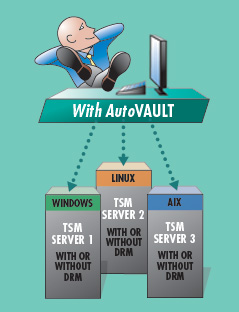
Manage
all your TSM servers from one AutoVAULT install
One
central AutoVAULT instance can manage multiple TSM servers
running on different platforms. This allows you to simplify your TSM operations and quickly
replicate configurations to a new TSM server instance.
All AutoVAULT options are defined separately for each
TSM server instance, allowing maximum flexibility.
Note:
An AutoVAULT license is required for each TSM server
instance. top
|
|
| |
In under 30 minutes you
can be running AutoVAULT in Test Mode ... without interrupting any of
your normal operations. You can get a real feel for how easy it is to
automate your vaulting , reporting, and DR with AutoVAULT, without
actually changing the status of any of your media. |